The University of Washington is committed to ensuring digital accessibility in our services, programs, and activities. If you encounter accessibility barriers using this web site, please visit Accessibility at UW and report an accessibility barrier.
Subscribe to Notify.UW
Go to notify.uw.edu and:
- Accept the Terms of Service.
- Add at least one point of contact (either your email address or phone number) to your profile.
- Standard messaging rates from your mobile phone service provider will apply if you choose to receive notification by SMS text message.
- When you add a new telephone number, Notify.UW will send a text to that number. You must reply with "YES" in order to confirm your phone number. At that point, your phone number is confirmed and Notify.UW will send texts to that number.
Subscribe to Be Notified When Courses Have Seats Available
From Notify.UW
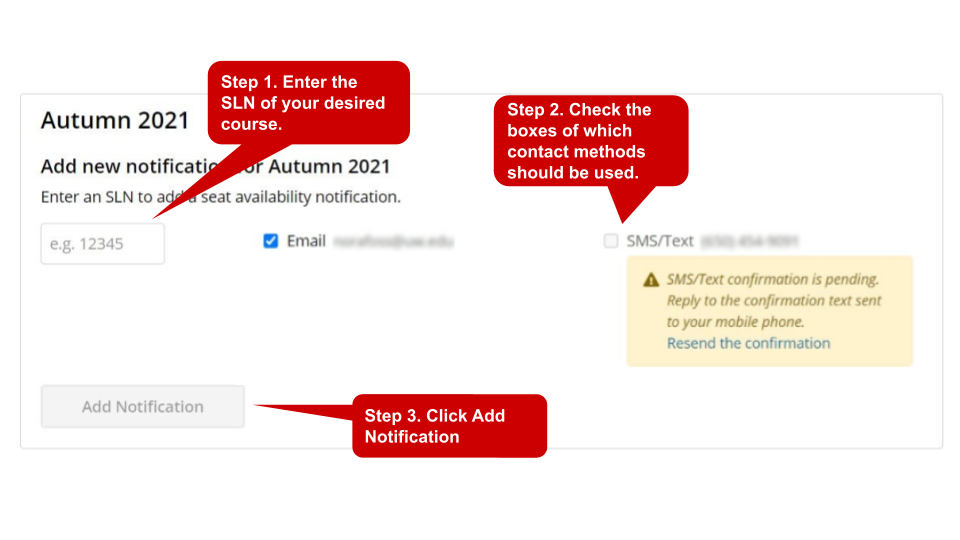 Go to notify.uw.edu and for each course section (SLN) you would like to be notified about:
- Under the Notifications header, navigate to the appropriate academic quarter.
- Enter the course SLN.
- Check the boxes for each type of notification you would like to receive (email and/or SMS).
- Click Add Notification.
From the Time Schedule
For each course section (SLN) you would like to be notified for, navigate to the UW Time Schedule's Current Section Status and:
- Click on: Subscribe to seat availability notifications.
- On the Notify.UW Add Class Notification screen, select how you want to receive your notification (email and/or SMS).
- Click Add Notification.
If you are not already subscribed to Notify.UW, you will also be prompted accept the Terms of Service and add at least one point of contact (email address or phone number).
Unsubscribe From Notifications
From Notify.UW
Go to notify.uw.edu and:
- Click Remove Notification next to any subscriptions that you no longer wish to receive notifications for.
- In the pop-up, click Remove Notification.
From Your Mobile Phone
Reply back to any Notify.UW SMS notification message by typing STOP SLN your sln for any SMS text subscription message notifications you no longer wish to receive (you will still receive email notification if subscribed). You will receive an SMS message to confirm that you have been unsubscribed. NOTE: If you are not receiving SMS text notifications you are subscribed for, you may have block listed your mobile phone number by typing a standard SMS keyword such as STOP, END, or UNSUBSCRIBE. To de-block list your mobile phone number and resume receiving SMS text notifications, you may reply with START to any Notify.UW SMS text message. Block listing is when a user asks their mobile phone carrier to block calls or SMS texts from a particular source.