- What is Similarity/SimCheck?
- What are UW's guidelines for faculty using Similarity?
- How complete is Similarity?
- How do I create an assignment using Similarity?
- How do I use Similarity if I don't use Canvas?
- What can I do to prevent plagiarism? (UW Libraries)
- How will I know if my instructor is using Similarity?
- Are student papers kept confidential?
- Can I request removal of my work from Turnitin's repository?
- What if Similarity is not working for my assignment?
- What about student copyright?
Instructor FAQ
What is Similarity/SimCheck?
Similarity by Turnitin (formerly known as SimCheck) is a Web-based service that can find and highlight matching or unoriginal text in a written assignment.
Faculty can set assignments that are submitted online through Canvas to be reviewed by Similarity, on a per-assignment basis. This is integrated with Canvas through the Canvas Plagiarism Framework. Student assignments submitted online will be checked by the service.
Similarity checks the assignment against its database of materials to look for matches or near-matches in strings of text. Similarity then generates a report online that summarizes and highlights matching text.
Faculty find the report useful as a tool to teach students proper citation practices and highlight the need for more student originality. Faculty can also use Similarity as a tool to detect possible instances of plagiarism.
It is up to the users of Similarity to analyze and interpret matching text in the report. Help content within the Similarity interface goes into more detail about how to interpret results.
Note: Similarity must be turned on before students submit work.
What are UW's guidelines for faculty using Similarity?
Faculty must notify their students in advance if they will use Similarity. The notice must be placed in the syllabus, and faculty should verbally inform students of the service, document retention and opt-out policies during the first class meeting.
Please see the full copy of the Guidelines for Faculty.
How complete is Similarity?
Turnitin has a large database of papers and assignments sent to them by students and teachers, a digitized version of the Gutenberg Collection of Literary Classics, and papers pulled from the Internet and various "paper mills," (i.e., services that sell term papers). However, the Turnitin database currently does not search books or articles in subscription databases. It may not find matching text from those sources or from subscription database such as The New York Times on the Web unless those materials also appear in assignments previously sent to Similarity. For those resources, it is best to search the online databases available through the UW Libraries and/or supplement your Similarity review by using a Web search engine such as Google or Bing.
See the complete Guidelines for Faculty for more details about interpreting the Originality Report.
How do I use Similarity if I don't use Canvas?
Similarity is not available outside of Canvas. If you are using Canvas only to have students submit their work to Similarity, these documents explain how to set up the assignment. One recommendation is to edit the Canvas course navigation to make it easy for your students to find what they need.
Note: Similarity is intended to evaluate student assignments only, not pre-publication journal articles.
How do I create an assignment using Similarity?
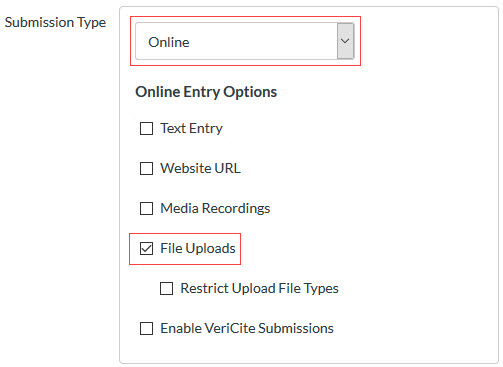
When creating an assignment, select the Online submission type in the drop-down menu and select the File Uploads check box.
From the Plagiarism Review drop-down menu, select SimCheck by Turnitin and customize the Turnitin Similarity plagiarism settings.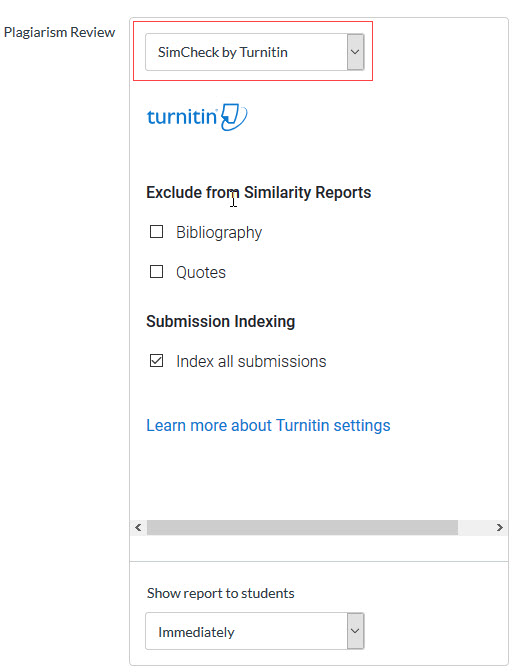
Using Similarity with Canvas Assignments
If you are using Canvas for the first time, the Turnitin guides for Canvas assignment management will show you how to set up an assignment in Canvas and correctly set Similarity options.
Simplify the Canvas Course Navigation
If you will be using the Canvas course only for students to submit assignments for review by Similarity, you may want to edit the course navigation so that students can easily find their way. You may also wish to change the home page of your course to the Assignments list.
Publish Your Canvas Course
Canvas courses and assignments are unavailable to students until published.
Student FAQ
How will I know if my instructor is using Similarity?
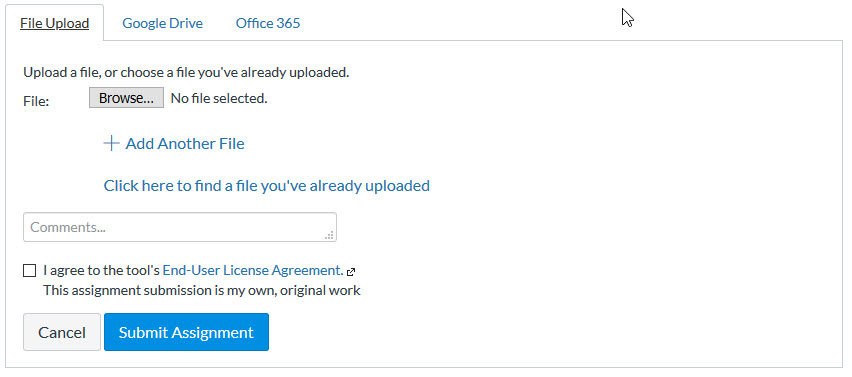
Faculty must notify their students in advance that they may be using a plagiarism detection service. Faculty must also verbally inform students of the service during the first class meeting. Learn more. In addition, when Similarity is turned on for an assignment, you will need to check a box indicating that the assignment you are submitting is your own, original work.
Learn more about Similarity in the Similarity Student Guide.
Are student papers kept confidential?
Yes. The UW license with Turnitin protects student privacy in accordance with FERPA, the Family Educational Rights and Privacy Act. UW's contract with Turnitin also formalizes these requirements for the confidentiality of student records and information.
Can I request removal of my work from Turnitin's repository?
Students can request that their assignments be removed from the Turnitin repository. Students have two options regarding their assignments being stored in the Turnitin database.
- If students do nothing, then the assignment will be stored in the Turnitin database for the duration of UW's contract with Turnitin.
- If the student requests, Turnitin will store the assignment only for the duration of the quarter. Once the class is over, the assignment will be deleted from the database. Students should email a request to help@uw.edu. The request must include the paper specifics, such as class name, assignment title, student name, and the URL for the paper.
What if Similarity is not working for my assignment?
Sometimes, intermittent issues can cause Similarity to not work properly for certain assignments. If this occurs, we recommend the following options:
- Click the "Resubmit" button for the assignment.
- If the previous step doesn't work, have the students resubmit the assignment.
What about student copyright?
The UW license with Turnitin specifies that students retain copyright to their submitted assignments and that the assignments will be stored only temporarily and solely for the purpose of using such papers as source material to prevent plagiarism of such papers.